
How to Purchase a Phone Number
This guide covers how to secure your official ClinicMonk phone number. Activating your number is a required step to enable the automated outreach, two-way SMS, and voice calling features included in your account.
Before You Start: Costs & The Usage Wallet
Purchasing a phone number involves two small costs:
- Monthly Lease: A recurring fee (typically $2.30 USD/mo) to keep your number active.
- Wallet Activation: If this is your first time adding a paid feature, the system will initiate a one-time $10 USD wallet top-up. This balance stays in your account to cover your monthly lease and any texts/calls you send.
For a full breakdown of how this works, see our Understanding Your Usage Wallet guide.
Overview of Purchasing a Phone Number in ClinicMonk
Purchasing a phone number in ClinicMonk enables you to send/receive calls and SMS directly through the platform. This is essential for tracking leads, configuring call behavior, and integrating communication workflows.
Key Benefits of Purchasing a Phone Number
- 2-Way Communication: Enables inbound/outbound SMS & voice
- Local or Toll-Free Presence: Builds brand trust and professional appearance
- Integration: Connects directly to campaigns, pipelines, users, and workflows
- Avoid Personal Numbers: Keeps business and personal calls/messages separate
- Supports Automation: Powers workflows, voicemail, call routing and call tracking
How to Purchase a Phone Number
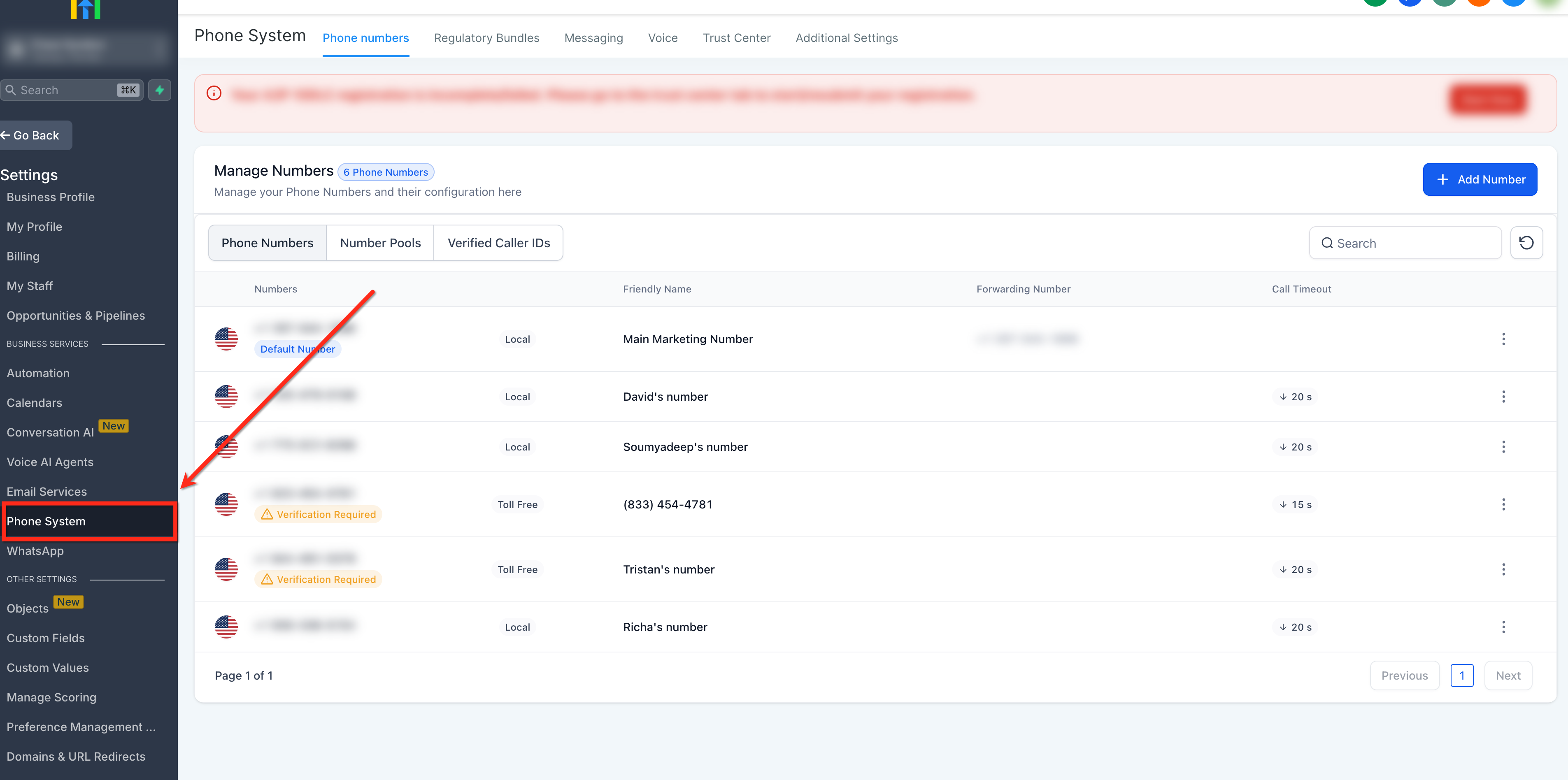
Step 1: Open Phone Number Settings
In your account, go to Settings (bottom-left) then select Phone Systems.
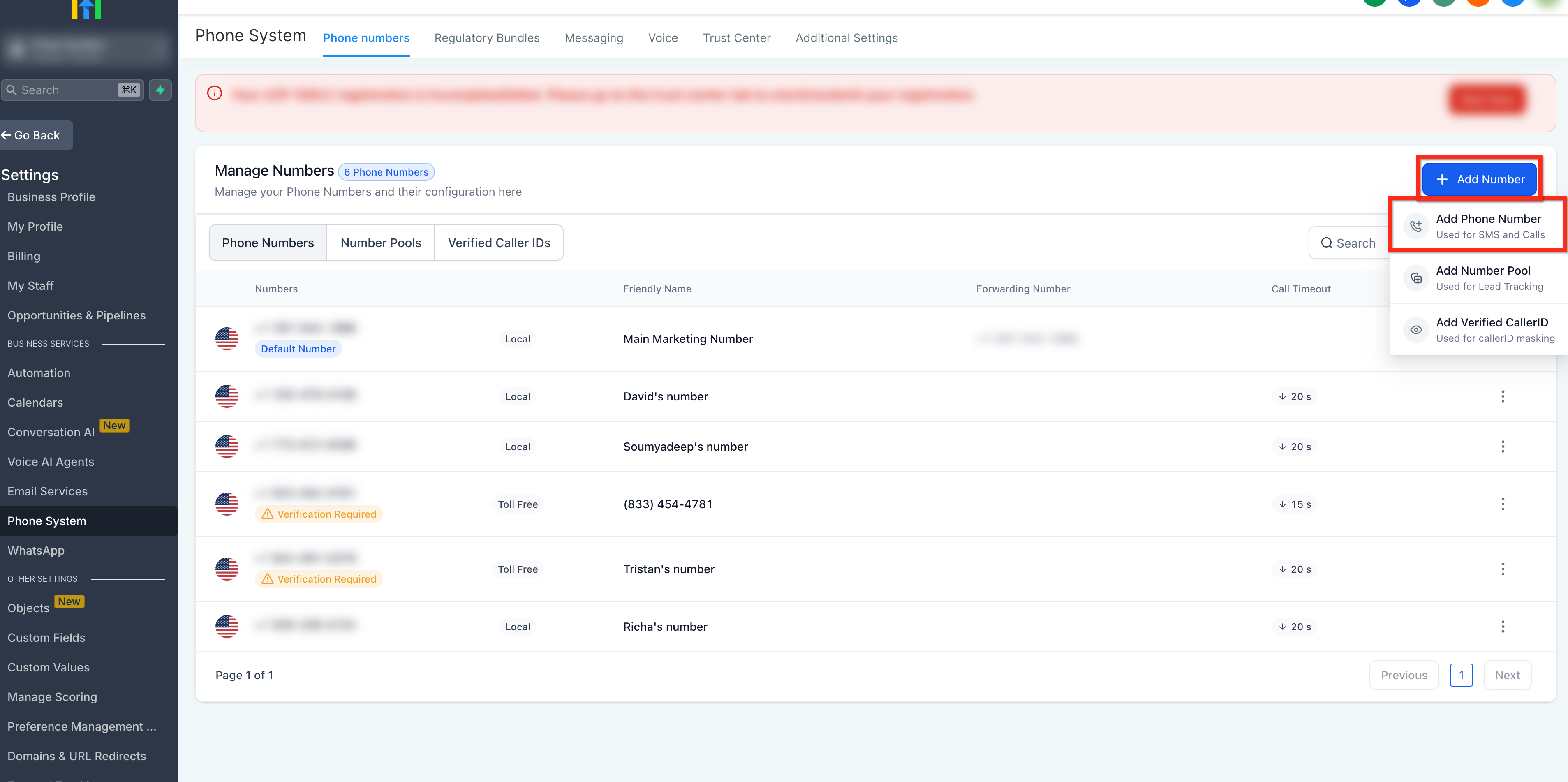
Step 2: Add New Number
Click + Add Number (top-right) then from the drop-down, select Add Phone Number.
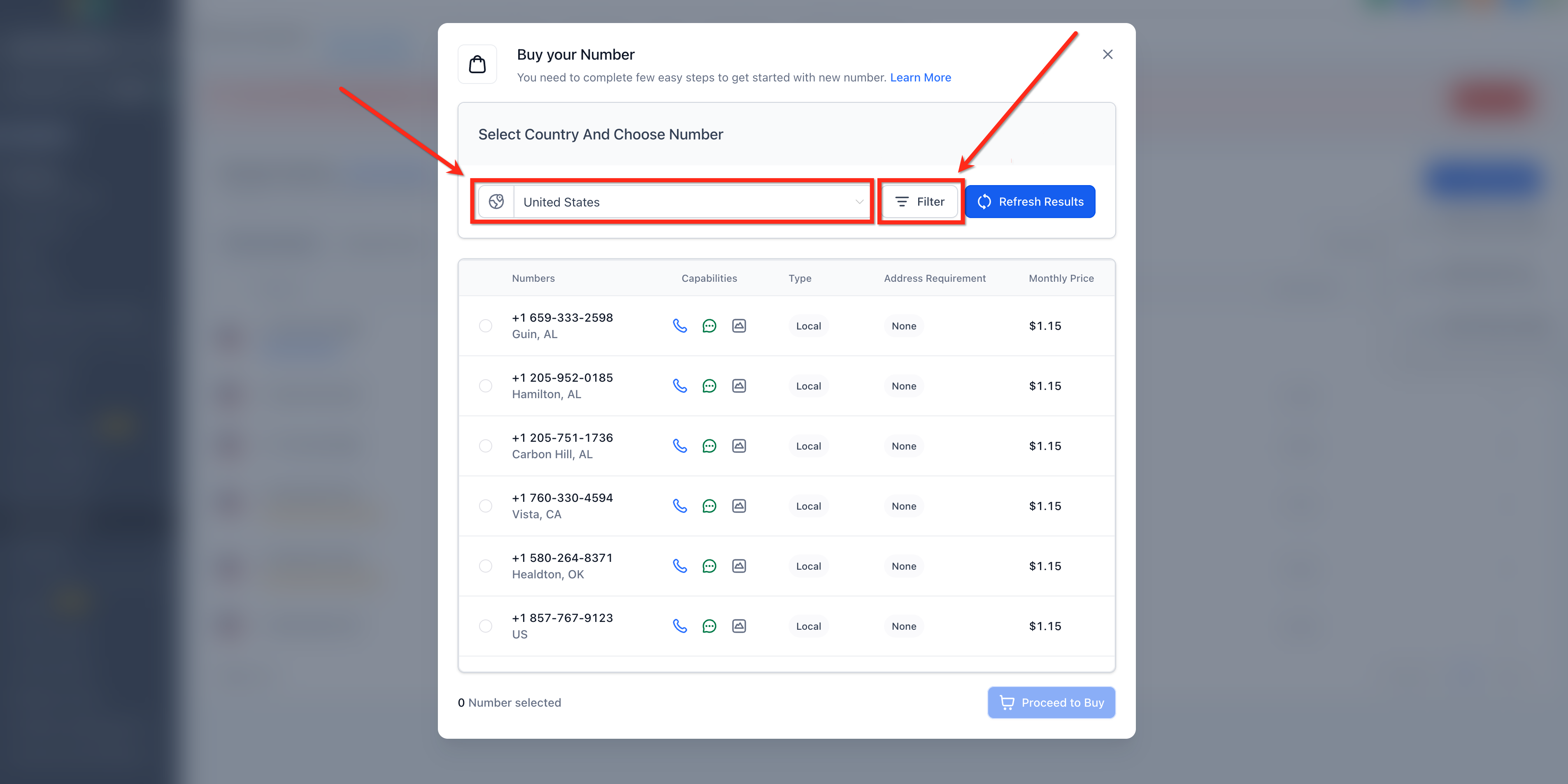
Step 3: Select Country and Set Filters
Select a Country from the dropdown. Then click Filters to refine results further on the basis of:
- Digit or Phrases and match it with (first, last or any) part of the number.
- Capabilities (SMS, MMS, Voice)
- Number Type (Local or Toll Free)
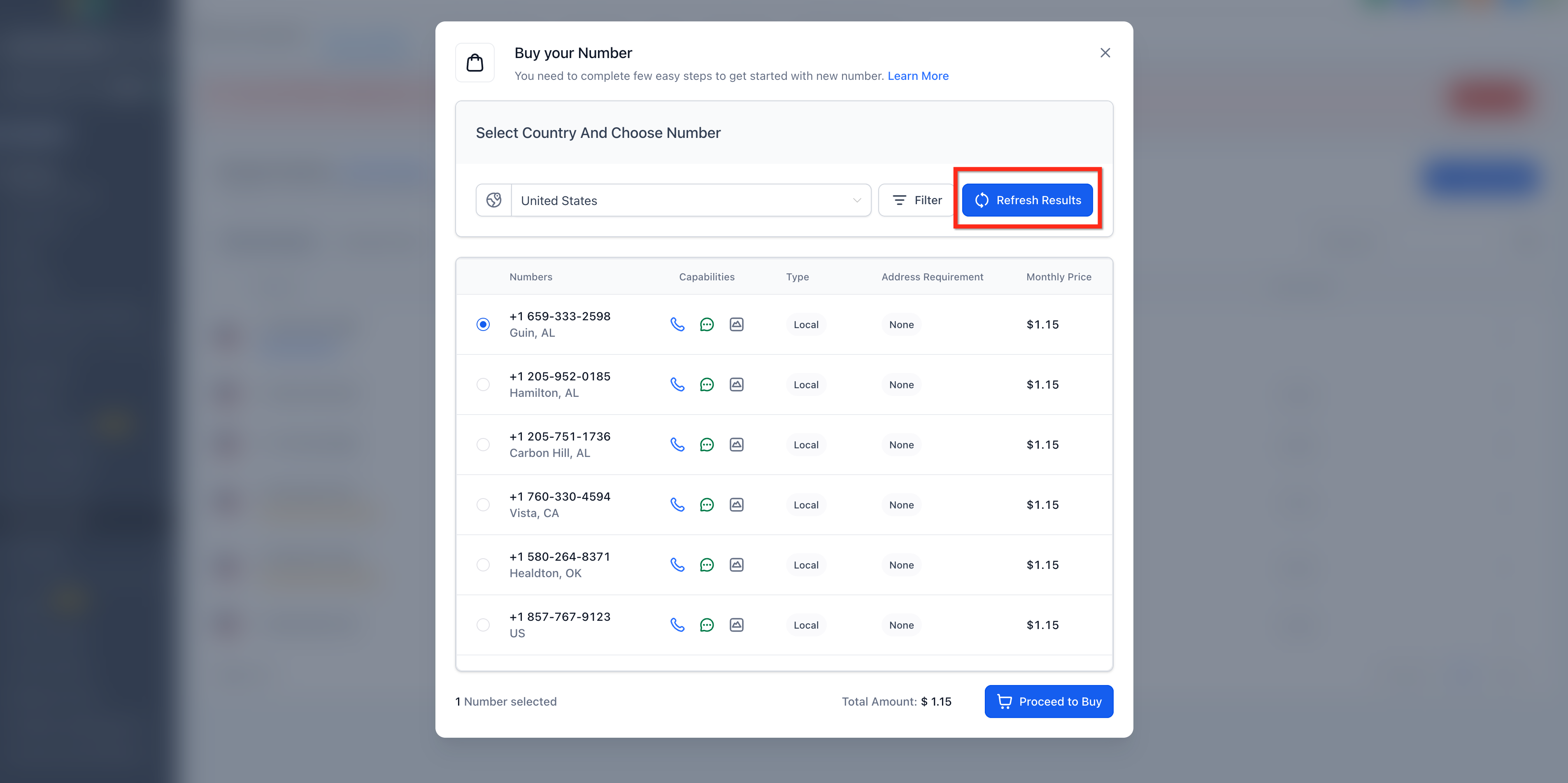
Step 4: Choose a Number
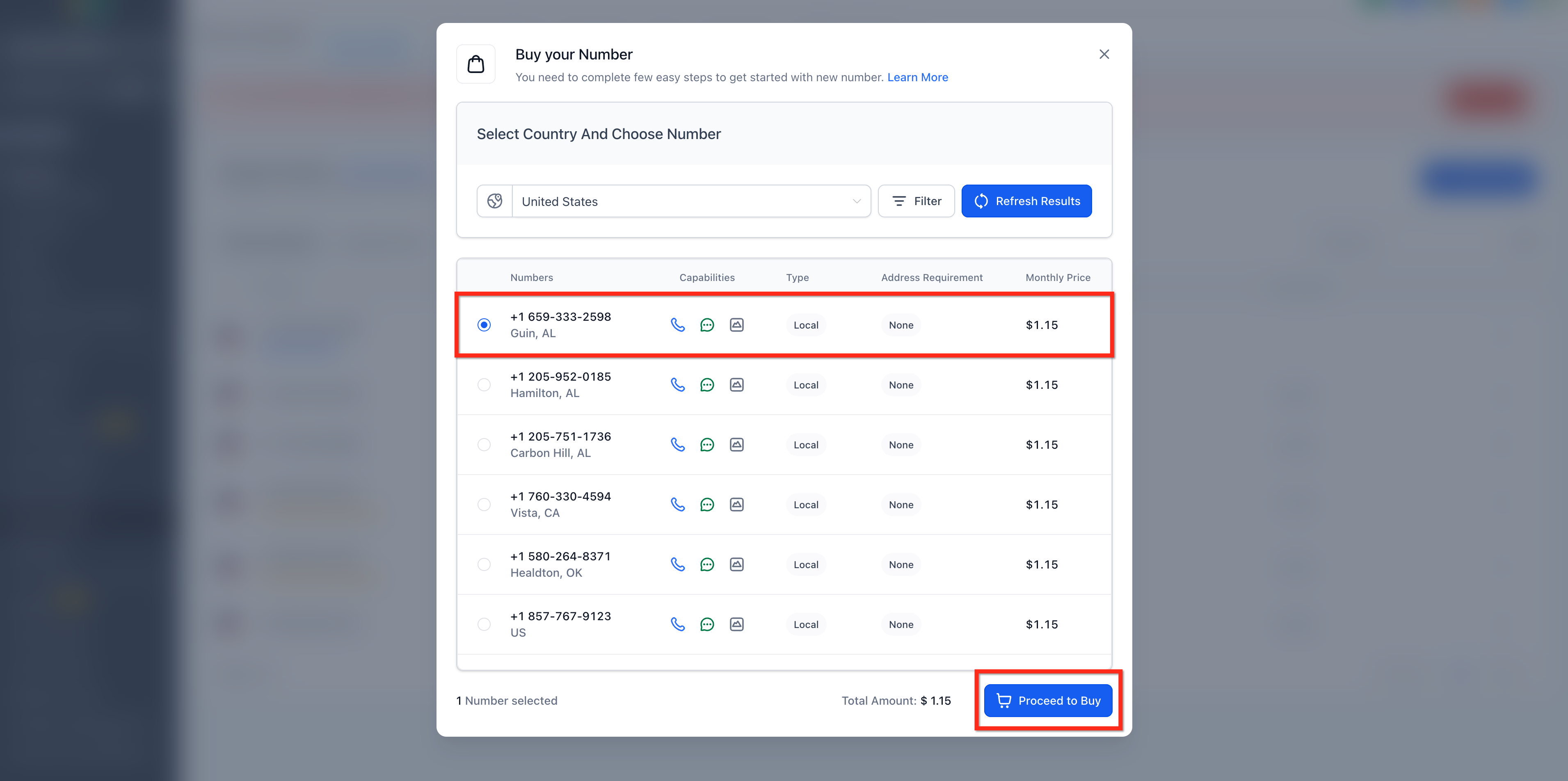
Review the number choices in the list. If you don’t like the options, click Refresh Results to see more options.
Step 5: Complete Purchase
Select the desired number then click Proceed to Buy to complete the transaction.
Step 6: Confirm Your Identity
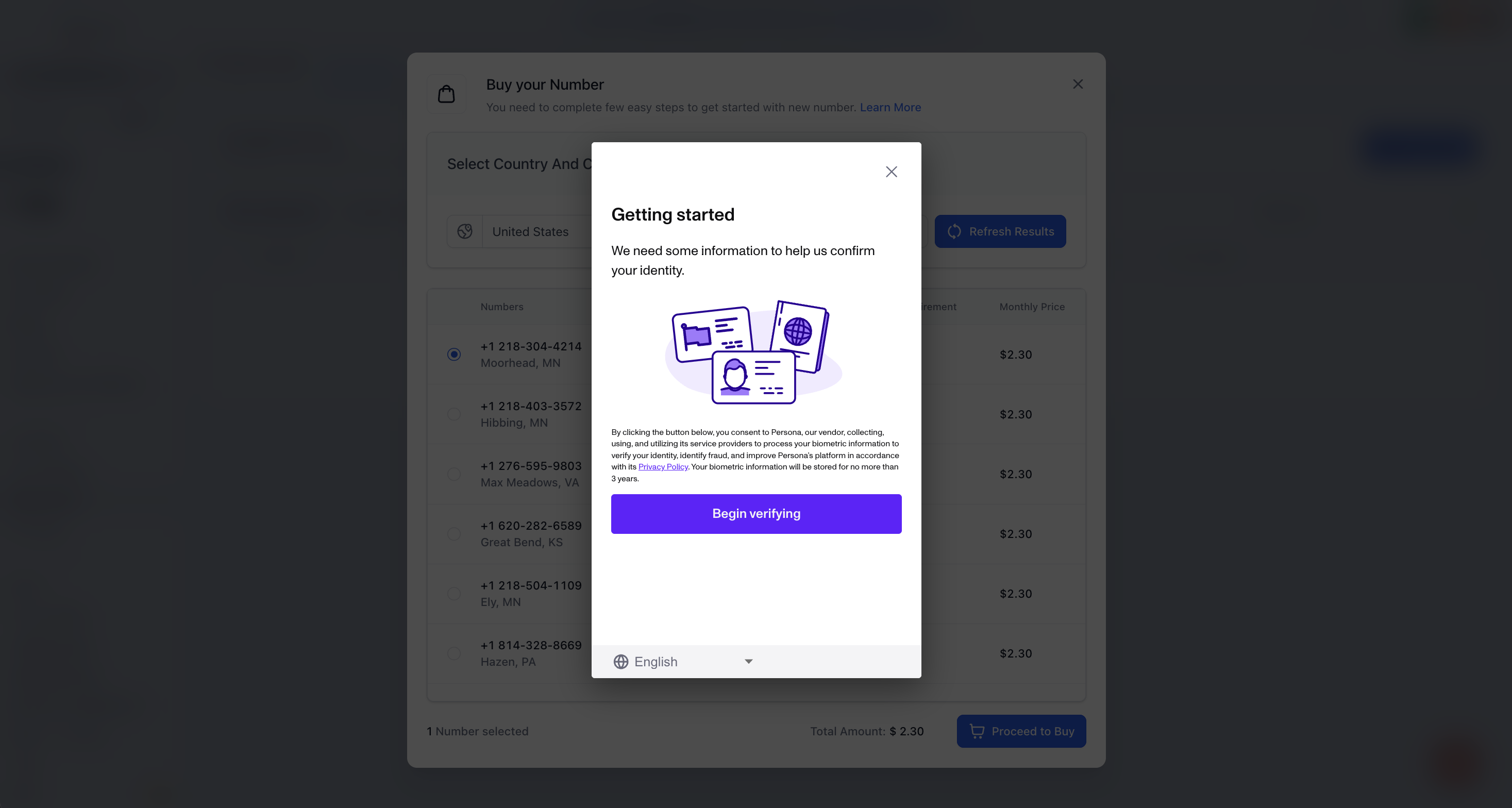
Before you can purchase a number, federal laws requires a one-time identity check. This is handled securely via Persona.
- Who must do this: The Business Owner or the Authorized Representative listed in your ClinicMonk Business Profile. Why? Using a staff member's account creates a legal "identity mismatch" for your phone line. To ensure long-term ownership and avoid issues if staff members leave, the owner should always be the one verified.
- What you’ll need: A physical Government ID (no photocopies) and a webcam or smartphone.
- The Process: You will be prompted to take a photo of your ID and a quick "3D Selfie."
💡 Pro-Tip: When the verification window pops up, select "Continue on Phone" or scan the QR Code. Smartphone cameras are significantly more accurate than laptop webcams for this process.
Click Begin verifying to complete the process.
What's Next? (The A2P Step)
Now that you've bought your number and verified your identity, your phone is active for calls. However, to send SMS/Text Messages, you must next complete the A2P 10DLC Registration in the Trust Center.
Note for Done-For-You (DFY) Tech Setup Customers: If you have our add-on Tech Setup service, our team will handle this configuration for you as part of your onboarding. If you’d like to upgrade your account to include the Done-For-You tech Setup, you can add it to your account here.
Can't Find a Number with Your Desired Area Code?
Why This Happens
|
Cause |
Explanation |
|---|---|
| Limited Inventory |
|
| High-Demand Area Codes |
|
Workarounds and Solutions
- Try Nearby Area Codes: Search for nearby or overlay area codes (e.g., if 310 is unavailable, try 424 in Los Angeles).
- Use Toll-Free or National Numbers: If local presence isn’t critical, consider a toll-free (e.g., 888, 877) or national number, which often have more availability.
Frequently Asked Questions
Q: What should I do if I can’t find a number with my preferred area code?
If no numbers are available in your preferred area code, try refreshing the results to see new available options. Phone number availability changes frequently. You can also search using broader filters or nearby area codes.
Q: Will I be charged monthly for purchased phone numbers?
Yes. you will be charged a small monthly rental fee for your number. Rates vary based on the type (local or toll-free) and region.
Q: Will this replace my existing clinic phone number?
No. Your current clinic phone number remains exactly as it is. Think of the ClinicMonk number as a dedicated "Marketing & Tracking" line. You will keep your original number for existing patients and use the ClinicMonk number for your website and ads to enable advanced features like automated text-backs and lead tracking.
Q: Should I choose a local or a Toll-Free number?
For most clinics practices, we recommend a local area code. It establishes a "local presence," which feels more personal and trustworthy to clients in your community. Toll-Free numbers are useful for national scaling but can sometimes feel a bit more "corporate" or impersonal for a local clinic.
Q: What happens when someone calls my ClinicMonk number?
The call is instantly forwarded to your existing phone (cell or desk). When you answer, you will hear a brief "Whisper Message" that says, "New lead from ClinicMonk, press 1 to connect." This lets you know the call is a new inquiry before you even start speaking.
Q: Why can’t I just use my current number for these features?
Standard phone lines don't have the "intelligence" to trigger automations. By using a ClinicMonk number, the system can detect if you are in a session and missed a call, allowing it to instantly send a Missed Call Text Back to the lead so they don't move on to a competitor.
Q: Can my clinic administrator complete the ID verification for the clinic owner?
Technically, an administrator can complete the verification using their own ID; however, we do not recommend this. To ensure long-term ownership and compliance, the verification should be tied to the business owner. Using a staff member’s identity creates a legal "mismatch" for your official phone line and can cause significant technical issues or service interruptions if that staff member ever leaves the clinic. For carrier compliance, it is best practice for the business owner to be the verified "identity" behind the clinic's phone system.
Q: Why was I charged $10 immediately after picking a number?
The system automatically loads an initial $10 into your Usage Wallet. Your monthly number fee and any other usage are deducted from this balance. For a full breakdown of how this works, see our Understanding Your Usage Wallet guide.
Need more support?
Browse the ClinicMonk Help Center for step-by-step guides on all our features. You can also click the support icon in the bottom right corner of your dashboard to ask our automated assistant a question. If you still need help, just leave a message through the chat and our team will get back to you by email.