
Understanding Your Usage Wallet
At ClinicMonk, we aim for total transparency in how your clinic is billed. Our platform operates on a two-part billing system: a fixed Monthly or Annual Subscription and a flexible Usage Wallet.
This structure ensures you have access to a secure environment while only paying for the specific volume of communications your clinic actually uses.
1. Your Monthly or Annual Subscription
Your monthly or annual subscription is your "access pass" to the ClinicMonk platform. It covers the infrastructure, security, and specialized tools built for your clinic. The subscription does not include the cost for sending and receiving emails, texts and voice calls.
2. The Usage Wallet (Pay-As-You-Go)
While your subscription covers the software, sending and receiving emails, texts, and voice calls involves costs from telecommunications carriers and email sending services, instead of charging you a high "all-inclusive" fee for messages you might not use, ClinicMonk uses a Wallet system. This acts like a prepaid utility meter, ensuring you only pay for your actual activity.
How the Wallet Works:
- Initial Balance & Activation: When you perform your first billable action, such as purchasing a phone number or sending an email, the system initiates an initial $10 USD wallet top-up.
- Why? This ensures your account has a starting balance to cover your first several months of number rentals and communication usage without service interruptions.
- Please Note: This is not a "hidden fee" kept by ClinicMonk. It is a prepaid credit that lives in your wallet and is used exclusively for your clinic's activities.
- Fractional Deductions: Every time an automated reminder goes out, a "Missed Call Text Back" is triggered, or one of the other usages mentioned below occurs, a few cents or dollars are deducted from this balance.
- Automatic Top-Ups: To ensure you clinic or your clients never miss an appointment message, the system will automatically "recharge" the wallet back to your set amount only when the balance drops below a certain threshold (e.g., $5 USD), which you can set. These top-ups are billed to your card on file in USD.
What counts as "Usage"?
Most small clinics find their monthly usage costs are very low, often less than the cost of a single cup of coffee, but it is important to know what triggers a deduction. While the primary triggers are communication-based, please note that if your clinic utilizes other rebillable services within the platform, those will also be charged to your wallet.
The main usage categories include:
- Outgoing SMS/Text: Examples include appointment reminders, two-way client chat, and automated "Missed Call Text Back" replies.
- Cost Example: SMS is billed at approximately $0.0166 USD per segment. A $10 USD wallet balance covers roughly 600 segments. (Note: A standard segment is 160 characters; longer messages or those with emojis may count as multiple segments).
- Emails: Examples include email campaigns, lead follow-ups, or automated consult confirmations.
- Cost Example: Email is billed at approximately $0.0014 USD per email. This means a $10 USD wallet balance covers roughly 7,145 emails, providing significant reach for your client communications.
- Phone & Calling:
- Monthly Number Fee: A small monthly fee for your dedicated ClinicMonk phone number (typically between $1 and $3 USD per month).
- Call Minutes (Forwarding & Features): Costs for dialing out to clients or forwarding incoming calls from your ClinicMonk number to your clinic's desk phone.
- Cost Example: Calling/Forwarding is billed at approximately $0.017 USD per minute. A $10 USD wallet balance covers roughly 588 minutes of talk time or feature usage.
- Note on Advanced Features: Features like the "Call Whisper" (identifying leads before you pick up) and capturing voicemails are billed as part of the total call minutes.
- Carrier Registration (A2P 10DLC): A small, one-time fee (usually less than $20 USD) required by mobile carriers to verify your clinic and prevent your messages from being marked as spam.
Why do we use this model?
Many platforms bundle "unlimited" texting into a $497+ USD monthly fee. This means a solo practitioner sending 100 texts a month ends up subsidizing a large clinic sending 10,000.
By using the ClinicMonk Wallet, we keep your monthly overhead low and ensure your costs only scale as your client list grows.
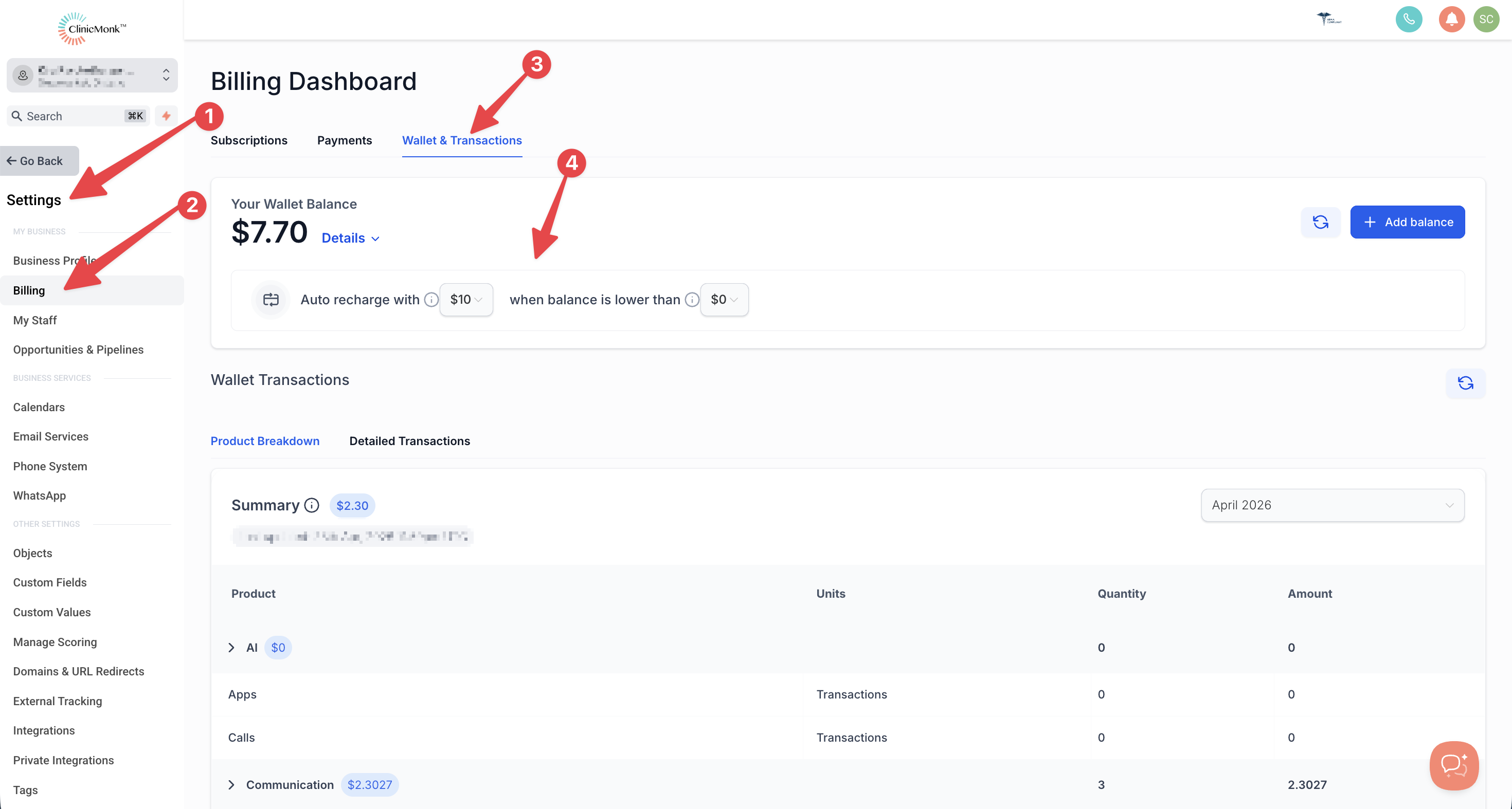
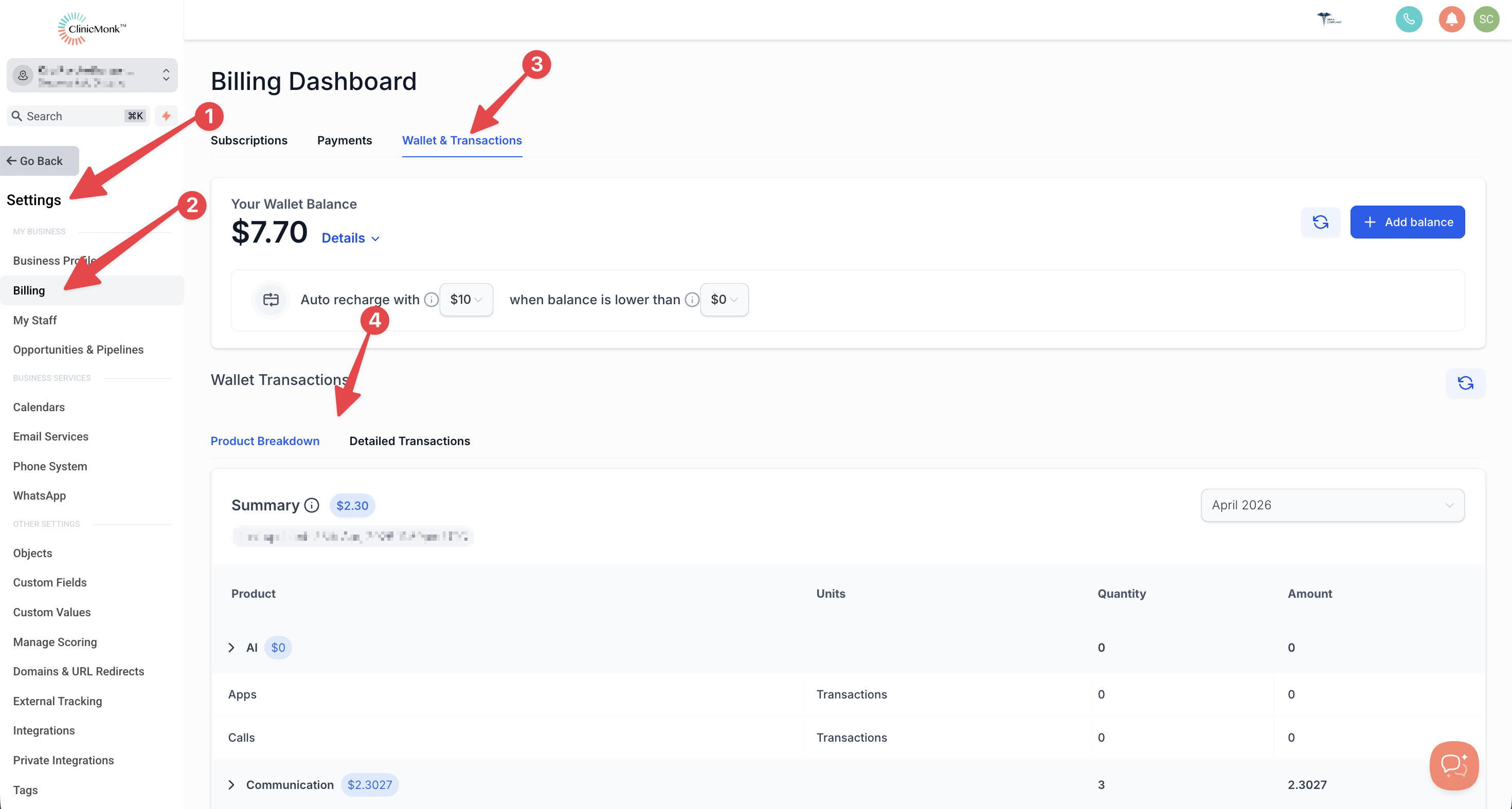
Transparency Tip: You can view your real-time wallet balance, set your own "Auto-Recharge" amounts, and view detailed transaction history anytime under Settings > Billing > Wallet & Transactions.
Frequently Asked Questions
Q: When exactly does the "Auto-Recharge" happen?
A: By default, your account is configured to Auto-recharge with $10 only when your balance hits $0 or lower. This ensures you aren't charged until your current credit is fully utilized.
Q: Can I change these amounts?
A: Yes. You have full control over how and when you are billed for usage. To adjust these settings:
- Log in to your ClinicMonk Dashboard.
- Navigate to Settings > Billing.
- Locate the Usage Wallet section.
Q: Where can I see all of the billing transactions?
A: You have full access to review all of the transactions related to your wallet:
- Log in to your ClinicMonk Dashboard.
- Navigate to Settings > Billing.
- Locate the Usage Wallet section.
Need more support?
Browse the ClinicMonk Help Center for step-by-step guides on all our features. You can also click the support icon in the bottom right corner of your dashboard to ask our automated assistant a question. If you still need help, just leave a message through the chat and our team will get back to you by email.